


Screenza
4.621.00 Reviews
App Specs
- Version
- 1.0.3
- Updated On
- License
- Free
- Downloads
- 100,000+
- Developer
- MOBİLEDO YAZILIM HİZMETLERİ
- Categories
- Parenting
- Platform
- Android
Screenshots
 Analysis by AppCompare
I judge screen-time tools less by how many charts they promise and more by whether they help me make one useful change without adding a new chore to the day. Screenza is aimed at that practical problem: noticing how often I reach for my phone and getting a clearer view of where that time goes. It sits in the parenting category, so it may interest families as well as individuals, but I see its value in having a straightforward way to reflect on everyday screen habits.
What to expect from its pace
Screenza’s purpose is to help analyze screen activity, rather than to entertain or run a demanding creative task. That sets a modest expectation for speed: checking a usage view or adjusting a reminder should feel like a quick check-in, not another activity that takes over the phone. I can’t responsibly promise instant reports or describe a measured launch time, but the app’s user-friendly focus points toward a simple, low-friction routine rather than a complicated setup.
That distinction matters if you are choosing between a dedicated tool and the screen-time controls already built into a phone. Built-in tools are convenient because they are already part of the device. A separate app can feel more intentional: opening it becomes a deliberate moment to review a habit instead of stumbling across a statistic in settings. The trade-off is that a standalone app has to earn a place in your routine. If you only want an occasional total, the existing phone controls may be enough; if you want a regular prompt to reflect, Screenza is more appealing.
When phone use gets busy
The useful test is not a quiet morning when I barely touch my phone, but a crowded day when messages, family logistics, work, and downtime all compete for attention. In that situation, screen activity can creep up without any single session feeling excessive. A review habit can make the overall pattern easier to notice, especially when I check it at a consistent time instead of opening the app every time I feel guilty about using my phone.
For a parent, a realistic routine might be to look at screen habits after the children are in bed, then decide on one small adjustment for the next day. That could mean putting the phone down during a particular family moment or creating a calmer boundary around evening scrolling. The useful part is the conversation prompted by the information, not treating a number as a verdict on someone’s parenting. I would use a tool like this to support a household agreement, not as a substitute for discussing why a boundary matters.
Reliability and the habit of checking
A screen-activity app only helps if I can make sense of what it shows and return to it without turning the review itself into another distraction. Screenza’s friendly, approachable positioning is a good fit for that kind of quick check. Still, the most dependable approach is to establish a small routine: review at a set point in the day, look for a pattern, and make one manageable change. Constantly checking for updates can undermine the very balance the app is meant to encourage.
I also try to separate a one-off unusual day from a genuine habit. A long phone session might come from travel arrangements, a family conversation, or a task that happened to require a screen. Rather than reacting to a single spike, I would compare the general shape of several ordinary days before changing a routine. That keeps the app’s role constructive: it helps me ask better questions about my time instead of simply telling myself to use my phone less.
Worth Reading Before You Choose

Flipboard Shows What News Apps Must Do Beyond the Feed

Switching to Android Auto Means Rethinking Your Driving Routine

Google Calendar Makes a Crowded Week Easier to Manage

Ludo King Makes the Most of the Minutes Between Plans

Baby Panda World Brings Quick Play to Modern Phones, but Its Game Library Feels Busy

ESPN’s Live Game View Makes Following Close Games Easier
Device fit and practical trade-offs
Screenza is free to download, with optional in-app purchases ranging from $3.99 to $19.99 per item. I’d start with the free version and decide whether the app fits my routine before considering a purchase. That is especially sensible for a tool whose value depends on repeated use: paying for more before finding a reason to return would not make the habit any easier to build.
The app is rated for Everyone and is developed by MOBİLEDO YAZILIM HİZMETLERİ. It has a 4.4 average from around 47 thousand ratings and more than 100 thousand installs. Version 1.0.3 supports Android 8.0 and later, so anyone on an older Android release should check compatibility before planning to use it. Those figures offer some context, but they cannot tell me whether the app will suit a particular family’s rules or an individual’s preferred way of reviewing phone use.
Families should also agree on how the app will be used before making it part of a child’s routine. A screen report is most helpful when it leads to a calm conversation about sleep, homework, or shared time; it is less useful as a surprise gotcha or a punishment by itself. For an adult trying to change a personal habit, the same principle applies: choose a specific goal first, then use the review to see whether that goal is realistic. The app can encourage awareness, but the decision about what to change remains yours.
Getting Started with Screenza
The first thing you’ll notice about Screenza is its sleek and modern interface. It’s incredibly user-friendly, making it easy for anyone to navigate. Setting it up is a breeze. Just download it from your app store, and you’re ready to go. The app guides you through each step, ensuring you don’t miss a thing. It’s like having a digital coach by your side, cheering you on.
Features That Stand Out
So, what makes Screenza stand out from the plethora of apps promising to manage your screen time? Let’s dive into some of its standout features:
- Customizable Alerts: You can set personalized notifications to remind you when you’ve been on your phone for too long. It’s like having a gentle nudge when you need it most.
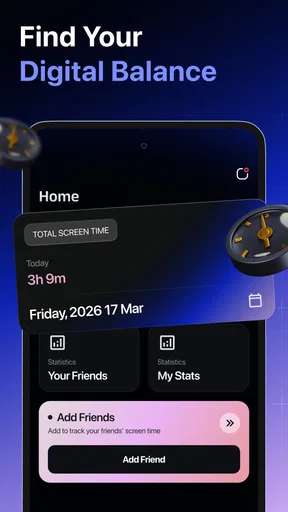
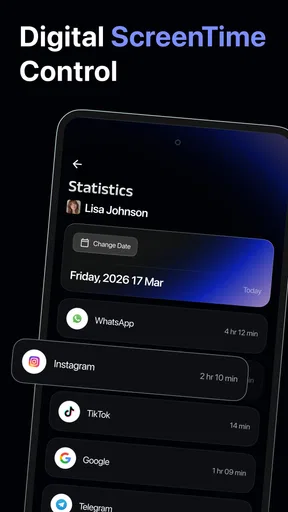
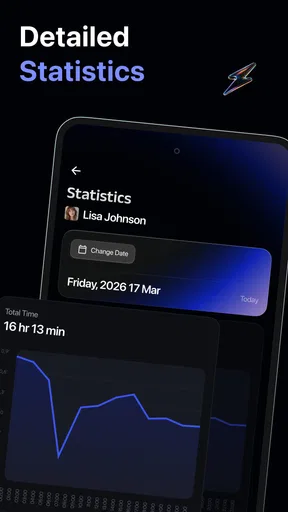
- Detailed Analytics: Screenza provides in-depth reports on your screen usage. It breaks down which apps you’re using the most and gives you insights into your habits. Trust me, seeing those stats can be a real eye-opener!
- Focus Mode: Need to buckle down and get some work done? Activate Focus Mode to block distracting apps for a set period. It’s like having a digital do-not-disturb sign.
How It Changed My Routine
Using Screenza, I've noticed a significant change in my daily routine. I’m more mindful of my screen time, and it’s helped me carve out moments for offline activities. The customizable alerts are a game changer. They’ve taught me to take regular breaks, which has improved my productivity and overall well-being.
And let’s talk about the analytics. Who knew seeing the cold hard facts about your phone usage could be so motivating? It’s like having a mirror held up to your digital habits, and it’s encouraged me to make some positive changes.
Things to Consider
While Screenza is fantastic, it’s worth mentioning that it does require some permissions to access your screen usage data. This is pretty standard for apps of this nature, but it’s always good to be aware. Also, if you’re the type who needs constant reminders, you might want to tweak the alert settings to avoid notification overload.
Another point to consider is that while the app is free, there are premium features available for purchase. If you’re looking to unlock the full potential of Screenza, you might want to explore these options.
Choosing a routine that fits
The combination of alerts, usage reports, and a focus option gives Screenza a more active role than a passive screen-time dashboard. I would not switch on every reminder immediately. A better first step is to pick one situation where phone use tends to run longer than intended, then use a single alert as a cue to pause. If the prompt arrives at an inconvenient moment, adjust the routine rather than dismissing every notification; otherwise, the reminders can quickly become background noise.
The analytics are most useful when I treat them as clues, not instructions. If one app appears prominent, I would ask what I was doing there and whether that use was useful. A high total can include practical tasks as well as leisure, so cutting time indiscriminately may not improve anything. The more thoughtful approach is to identify one repeat pattern—such as automatic checking during a break—and decide what I would rather do in that moment. That gives the numbers a purpose beyond making me feel bad.
Focus Mode also calls for a little planning. I would use it before a known stretch of focused work or family time, rather than turning it on impulsively when I am already distracted. Blocking access can be helpful when the goal is clear, but it may be a poor fit if I need to stay reachable or use the phone for a task. In that case, a lighter boundary, such as an alert or simply placing the phone out of reach, may be more practical. The best tool is the one that supports the situation instead of interrupting it.
Who is likely to benefit—and who may not
I can see Screenza suiting someone who wants a visible nudge to pay attention to phone habits and is willing to review them regularly. It may also help a parent start a shared conversation about screen routines, provided the app is used openly and the family agrees on the goal. Its mix of reminders, analytics, and a focus option makes it more relevant to people who want to act on what they notice, rather than just collect a daily total.
It is less compelling for someone who already uses built-in controls successfully and only needs a basic limit, or for anyone who dislikes notifications and will routinely ignore them. It is also not a replacement for family discussion or an all-purpose solution to arguments about devices. If your main need is strict household enforcement, compare the available tools on your own phone and decide whether their controls fit better; Screenza’s value, as I see it, is in awareness and intentional pauses.
A realistic way to test it
For a low-pressure trial, I would spend the first few days observing rather than trying to overhaul my routine. I’d note when I tend to pick up the phone and which moments feel least intentional, then choose one modest change. For example, a parent might decide that dinner is phone-free and use an alert as a reminder to put the device aside. An adult who loses time to casual checking could instead try a planned focus period during one task. These are small experiments, not promises that an app will change a habit on its own.
After that, I would check whether the intervention actually helped. Did the reminder arrive at a useful time? Did Focus Mode protect the task, or did it make the phone harder to use when it was needed? Did reviewing the report lead to a specific decision? If the answer is no, I would change one setting or return to the phone’s built-in tools rather than adding more rules. That makes the trial useful even if Screenza turns out not to be the right fit.
Final Thoughts
All in all, Screenza has been a fantastic addition to my app arsenal. It’s intuitive, powerful, and genuinely helpful in managing screen time effectively. If you’re looking to take control of your digital life, give Screenza a try. You might just find it’s the app you didn’t know you needed.
So, what are you waiting for? Dive into the world of mindful screen time management and see what changes you can make. Happy exploring!
My practical verdict is that Screenza makes most sense when I approach it as a gentle structure for a specific goal, not as a magic fix or a reason to monitor every minute. Start with the free option, keep the first experiment small, and judge the app by whether its prompts and reports help you make one change you can sustain. If you want a friendlier, more deliberate check-in than your phone’s settings provide, it is worth trying; if you need a simple limit or prefer not to add another app, the built-in alternative may be the better choice.
Pros
- User-friendly interface for easy navigation.
- High-quality screen recording capabilities.
- Supports multiple file formats for sharing.
- Lightweight app
- doesn't consume much space.
- Customizable recording settings for flexibility.
Cons
- Limited editing tools available within the app.
- No cloud storage integration for backups.
- Ads can be intrusive during use.
- Free version has watermarked recordings.
- Requires in-app purchases for advanced features.
FAQs for Screenza
What is Screenza and what does it offer?
Screenza is a versatile screenshot and screen recording app available for Android and iOS. It allows users to capture high-quality screenshots, record screen activities, and edit images with various tools. The app also offers cloud storage integration for easy sharing and access across devices.
Is Screenza free to use, or does it have a paid version?
Screenza offers both a free version and a premium version. The free version includes basic features like screenshot capturing and simple editing tools. The premium version, available via subscription, unlocks advanced features such as unlimited cloud storage, enhanced editing tools, and watermark removal.
How user-friendly is Screenza for beginners?
Screenza is designed with an intuitive user interface, making it accessible for beginners. The app includes easy-to-follow tutorials and guides that help new users navigate through its features. Users can quickly learn to capture, edit, and share their screen content with minimal effort.
What devices are compatible with Screenza?
Screenza is compatible with most Android and iOS devices. It supports a wide range of smartphones and tablets running recent versions of their respective operating systems. Users should ensure their device meets the minimum OS requirements specified on the app's download page.
Does Screenza protect my privacy and data?
Screenza prioritizes user privacy and data protection. The app uses encryption to safeguard user data and complies with privacy laws and regulations. Users can manage their privacy settings within the app, ensuring their captured content and personal information remain secure.


